
By Calvin Wheaton September 21, 2026
A service business can accept deposits on a website without an online store by using a payment link, a provider-hosted payment page, or a virtual terminal. The right setup depends on whether the customer pays online, settles a specific invoice, or gives payment details to staff by phone.
A consultant collecting a project retainer does not need the same checkout infrastructure as a retailer selling 300 products. Neither does a contractor who takes scheduling deposits, a freelancer who bills after milestones, or an appointment business that needs a card payment before reserving time.
There is no catalog to maintain, no cart to configure, no inventory count, and no shipping workflow. What matters is connecting each payment to the right customer, job, appointment, or invoice while keeping card-entry functions in the payment provider’s environment wherever practical.
Three Ways to Take Website Payments Without Building an Online Store
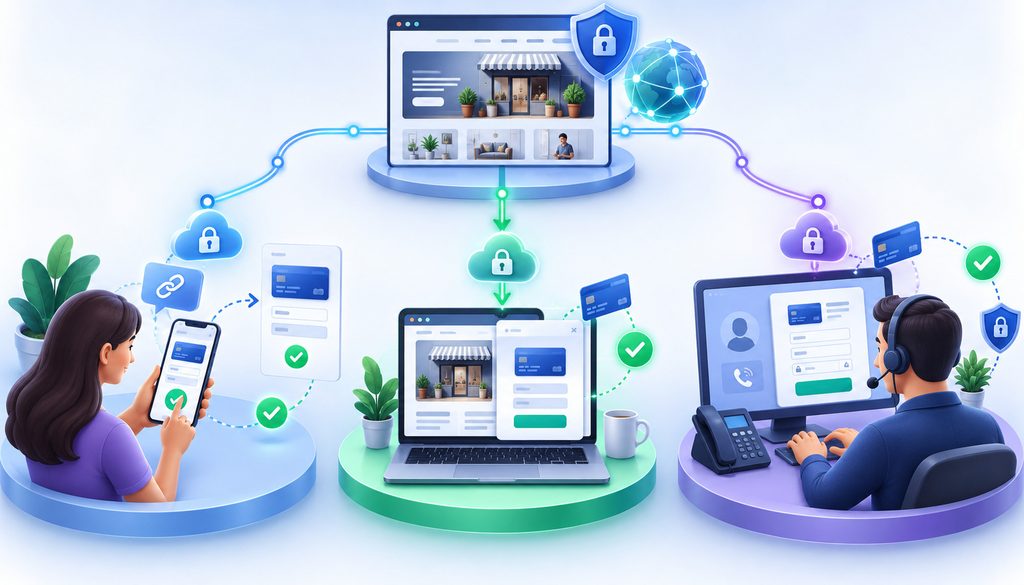
For most small service businesses, three acceptance tools cover the gap between “no online payments” and “full ecommerce store.”
| Method | Who Enters Card Details | Best For | Main Tradeoff |
| Payment link | Customer | Deposits, invoices, simple service payments | Less checkout customization |
| Hosted payment page | Customer | A more integrated website payment flow | Implementation and PCI scope must be understood |
| Virtual terminal | Staff | Phone payments and manually entered invoices | Keyed/MOTO risk, controls, and pricing can differ |
These tools solve different problems. A payment link is a customer-initiated online transaction. A virtual terminal is a staff-operated payment interface. A hosted page sits between those extremes by giving the customer a structured checkout without requiring the business to operate a complete ecommerce store.
1. Payment Link
A payment link is a URL that opens a checkout hosted by a payment provider.
A business can send that URL by email or text, attach it to a quote, place it on an electronic invoice, or put it behind a button on a website.
Typical uses include:
- a booking deposit;
- a project deposit;
- a fixed service retainer;
- an invoice balance;
- a one-time payment request.
The merchant’s builder-made website does not need to generate the card fields. The customer follows the link and enters payment information into the provider’s checkout.
2. Hosted Payment Page or Embedded Hosted Checkout
A hosted payment page provides more structure than a one-off link.
Depending on the provider, the business may be able to collect an invoice number, customer email, project reference, service selection, or other non-card information while the payment provider handles the card-entry elements.
The payment experience can take several forms:
- a redirect to the provider’s site;
- a fully hosted checkout page;
- a correctly implemented provider-hosted iframe inside the merchant’s page.
A service company may choose this model when it wants the payment process to feel more connected to the rest of the website without building a product catalog and shopping cart.
3. Virtual Terminal
A virtual terminal is for situations in which staff, rather than the customer, enters the payment details.
The customer may call the office and authorize a deposit. An employee signs in to the processor’s secure virtual-terminal interface, enters the transaction, obtains the authorization result, sends a receipt, and records the payment against the correct invoice or job.
PCI SSC describes virtual terminals as Internet-based solutions hosted by an acquirer, processor, or other third party in which the merchant manually enters payment-card data. Its SAQ C-VT guidance also makes clear that eligibility for that particular validation path depends on much more than simply using a virtual terminal.
A phone payment is therefore not the same workflow as sending the customer a checkout URL.
Payment Links for a Service Business Website
Payment links are often the least complicated starting point for owners who already have a website but do not want to install ecommerce software.
A basic workflow looks like this:
- Create the payment request in the payment provider’s dashboard.
- Enter the fixed amount, invoice amount, or permitted amount type.
- Add a useful service, project, customer, or invoice reference.
- Generate the secure checkout URL.
- Add that URL to a website button, quote, invoice, email, or text.
- Let the customer enter payment information on the hosted checkout.
- Confirm that the transaction succeeded.
- Send or trigger a receipt.
- Match the transaction to the job or invoice in the business’s records.
That removes a large amount of technical work from the website itself.
The site still performs an important job: explaining what the customer is paying for, the applicable deposit or cancellation terms, and what happens next. It simply does not have to become the system that captures card numbers.
How to Add a “Pay Deposit” Button to a Builder Page
Most website builders allow an owner to turn a normal button into a link. That is enough for many deposit workflows.
A builder-agnostic setup is:
- Create the hosted payment link: Configure the payment amount and description in the payment provider’s dashboard.
- Copy the checkout URL.
- Open the existing service or booking page in the website editor.
- Add or select a button.
- Give it accurate wording: Examples include “Pay Deposit,” “Secure Your Booking,” “Pay Project Deposit,” or “Pay Invoice.”
- Paste the hosted checkout URL into the button’s link setting.
- Publish the page.
- Run an approved test transaction or small live test, as appropriate for the provider.
- Verify the success page and customer receipt.
- Confirm that the payment appears correctly in the provider dashboard and internal job or invoice record.
Do not label a button “Pay Full Balance” when it collects only an initial deposit. Small wording mistakes create large reconciliation and dispute problems later.
If the merchant account is already active, the payment-link function is enabled, and the business has access to its website editor, this type of change can often be a short website task and may be completed within an hour. Account underwriting, payment-provider activation, compliance work, or troubleshooting can make the total setup longer.
A business evaluating whether it even needs ecommerce functionality may also find the distinction between basic and feature-heavy site plans useful when it compares free and paid website builders around its actual business needs.
When a Hosted Payment Page Is Better Than a Simple Link
A plain payment link works well when one URL and one amount are enough.
A hosted payment page becomes more useful when the payment needs context.
For example, a consultant might want the payer to supply:
- invoice number;
- project number;
- business email address;
- customer reference;
- approved amount;
- service category.
A contractor might want separate deposit choices for consultations, inspections, or scheduled work.
The business still does not need a traditional shopping cart. It needs a payment experience with enough fields and rules to make reconciliation reliable.
Full Redirect
With a redirect flow, the customer clicks the merchant’s button and moves to a checkout page generated by the payment provider.
The merchant page initiates the journey, but the provider delivers the payment page on which card information is entered.
This is conceptually simple and keeps the merchant from building its own card-entry form.
Provider-Hosted Iframe
An iframe can display third-party content within a merchant-controlled webpage.
For SAQ A eligibility, PCI SSC says all fields and web elements involved in collecting or processing payment-card data must originate only and directly from the PCI DSS validated third-party provider. If a merchant-controlled element is involved in collecting or processing the payment data, the applicable PCI scope can change.
An iframe therefore should not be treated as “secure because it looks embedded.” The implementation architecture matters.
Merchant-Generated or Direct-Post Form
Direct post is different.
PCI SSC distinguishes direct-post designs because the merchant website produces some or all of the page used to accept the payment information, even though the browser may submit that information directly to a payment processor.
That distinction is one reason direct-post environments do not automatically fit the same SAQ A eligibility model as fully provider-generated redirect or iframe payment pages.
For a non-technical owner who only needs deposits or invoices, building custom payment fields on the merchant website is usually unnecessary complexity.
PCI Basics: Hosted Payments Can Reduce Scope, Not Eliminate Responsibility

PCI DSS still matters when the merchant outsources card handling.
The current PCI DSS version supported by PCI SSC is PCI DSS v4.0.1. PCI DSS v4.0 was retired at the end of 2024, leaving v4.0.1 as the active version while the Council works on the standard’s next iteration.
A hosted architecture can substantially reduce what the merchant’s own website does with payment data. That is not the same as saying PCI DSS disappears.
Redirect Payment Pages
With a properly implemented redirect, the merchant can send the customer from its website to a PCI DSS compliant provider’s checkout.
The customer enters card information on the provider’s payment page rather than into a card form generated by the merchant site.
Hosted Iframes
A provider-hosted iframe may also qualify for SAQ A when all payment-page elements that collect or process payment-card information originate directly from the compliant provider and all other eligibility criteria are met.
PCI SSC’s current SAQ A eligibility guidance for embedded payment forms adds another distinction: the 2025 SAQ A revision requires merchants using embedded third-party forms to confirm that their site is not susceptible to script attacks that could affect the ecommerce system.
PCI SSC says this specific script-related eligibility criterion applies to embedded payment forms, not ordinary redirects or fully outsourced payment links.
SAQ A Still Has Ecommerce Security Work
One of the most important 2026 PCI clarifications concerns external vulnerability scanning.
PCI SSC states that SAQ A ecommerce merchants with webpages that redirect transactions to a third-party payment provider or contain an embedded third-party iframe are subject to the SAQ A external vulnerability-scanning requirements in PCI DSS v4.x. That includes ASV scans under Requirements 11.3.2 and 11.3.2.1 for the applicable merchant ecommerce webpages.
PCI SSC also explains that the scans used to meet Requirement 11.3.2 must be conducted through a PCI Approved Scanning Vendor. Its published guidance describes passing scans at least once every three months.
Businesses validating through SAQ A should therefore review the current PCI SSC guidance on ASV scanning for redirect and iframe ecommerce pages rather than relying on older articles that describe outsourced checkout as requiring almost no technical PCI work.
The exact SAQ and validation obligations are determined by the merchant’s environment and the entity enforcing its compliance program, such as its acquirer, payment facilitator, or payment brand. A merchant should confirm the correct validation path instead of assuming that a particular checkout design automatically makes it “SAQ A.”
Keeping Card Data Out of the Merchant’s Own Form
“Card data stays off your site” is useful shorthand only when the architecture actually supports it.
For a fully hosted redirect, the customer’s card information is entered on the provider’s page.
For an SAQ A-eligible iframe implementation, the provider must directly supply the card-data collection elements.
That is different from creating ordinary HTML card-number fields inside the website builder and sending the resulting data somewhere else.
The practical rule for a small service business is simple: if you do not need to build or control card-entry fields, do not.
Keep the website focused on:
- the service description;
- amount or deposit explanation;
- cancellation/refund policy;
- invoice or project reference;
- link or embedded provider checkout;
- confirmation and next steps.
The merchant-controlled website still needs sensible security practices because its links, scripts, credentials, and pages can affect how customers reach the real payment experience.
Virtual Terminal for Deposits: When the Customer Calls Instead of Clicking
Some customers will not complete a payment link.
A homeowner may call while scheduling urgent service. A business client may want the office administrator to take the corporate card by phone. An existing client may simply prefer speaking with someone.
The workflow should be:
- Customer calls the business.
- Authorized staff opens the processor’s approved virtual terminal.
- Staff enters the required payment information directly into that interface.
- The transaction is submitted for authorization.
- Staff confirms only that the payment succeeded or did not succeed.
- A receipt is delivered.
- The payment is tied to the correct customer, invoice, appointment, or job.
What should not happen is equally important.
Do not make “temporary” card-number storage part of the process by:
- writing a card number on paper for later entry;
- adding it to a CRM note;
- pasting it into a spreadsheet;
- asking a customer to email it;
- sending it through normal messaging;
- saving it in an ordinary website contact form.
Staff should enter the data directly into the processor or provider’s approved payment interface according to the provider’s operating instructions.
Why Virtual-Terminal Transactions Are Not the Same as Website Ecommerce Payments
Both online checkout and phone-entered transactions can be card-not-present, but they are not the same acceptance flow.
- Ecommerce: the customer enters payment credentials through an Internet checkout.
- Telephone/MOTO: the merchant receives the payment information through a mail or telephone-order process and enters it for processing.
Visa, for example, identifies both ecommerce and mail order/telephone order as card-not-present use cases while treating them as distinct transaction types.
That distinction matters because the processor or acquirer may apply different:
- transaction indicators;
- fraud controls;
- authorization tools;
- contractual terms;
- pricing schedules.
A virtual terminal does not make a transaction “card-present” merely because the merchant is typing a physical card number into a browser.
For a concise primary-source distinction, Visa’s current acceptance documentation lists both ecommerce and MOTO under online card-not-present payment use cases.
What About Keyed Virtual-Terminal Rates?
There is no universal “virtual terminal rate.”
Two merchants using similar interfaces can have different economics because pricing depends on factors such as:
- merchant agreement;
- processor or payment facilitator;
- card type;
- network;
- transaction characteristics;
- ecommerce versus MOTO handling;
- merchant category and risk profile;
- pricing model;
- gateway or software fees.
Some providers publish simple bundled prices. Others pass through network costs plus a processor markup. Others have separate pricing for manually entered transactions.
For an actual cost comparison, check the merchant pricing schedule rather than relying on a generic statement such as “keyed payments cost 0.5% more.”
CVV: Useful for Authorization, Not Something to Store
A payment provider may request a card verification code during an appropriate card-not-present transaction.
PCI SSC classifies card verification values such as CVV2, CVC2, CID, and CAV2 as sensitive authentication data. Its current guidance says they may be collected when needed for authorization but must not be stored after authorization, even in encrypted form.
That is another reason card details should go directly into the approved checkout or virtual terminal rather than passing through notes, emails, recordings, or homemade forms.
How Much Should a Service Business Take as a Deposit?
There is no universal deposit percentage for every service business.
The right structure depends on the economics and obligations of the job, including:
- project size;
- labor scheduling;
- materials commitments;
- appointment scarcity;
- lead time;
- cancellation risk;
- service type;
- written contract;
- local law or industry-specific rules.
A business should choose a deposit that fits the commercial purpose and confirm any industry- or jurisdiction-specific legal restrictions that apply to it.
Fixed-Dollar Deposit
Illustrative example: $100 to reserve an appointment.
A fixed amount works well when every booking consumes roughly the same amount of scheduling capacity.
Percentage Deposit
Illustrative example: 25% of an accepted project estimate.
A percentage can scale with custom-project value, but the percentage should reflect the business’s real workflow rather than a supposed universal rule.
Milestone Payments
Illustrative example:
- initial deposit;
- midway progress payment;
- final balance at completion.
This structure can make more sense when the project lasts several weeks or includes distinct work stages.
Full Prepayment
Some fixed-price appointments or standardized services may be paid in full before delivery.
That is an operating decision, not a default rule for every business.
How to Collect the Rest After the Deposit
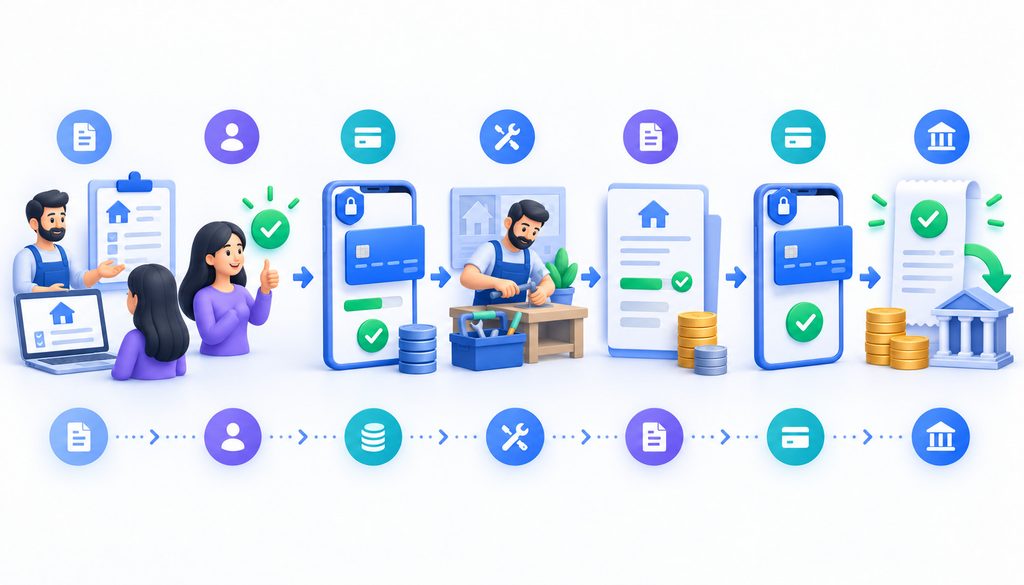
The deposit should become part of the invoice record, not a disconnected payment.
Consider this illustrative $1,000 project:
| Item | Amount |
| Service total | $1,000 |
| Deposit already paid | -$250 |
| Remaining balance | $750 |
A clean workflow is:
- Customer accepts the $1,000 estimate.
- Business requests a $250 deposit.
- Customer pays $250.
- Receipt identifies the payment as the project deposit.
- Business records $250 against the customer’s project.
- Work reaches the agreed billing point.
- Final invoice shows the original $1,000 total.
- Invoice subtracts the $250 prior payment.
- Amount due is $750.
- Customer receives a $750 invoice-specific payment link.
- Successful payment closes the invoice.
Do not create another payment request for the original $1,000 unless the invoicing system also clearly applies the prior $250 credit. Otherwise, a customer can be asked to pay money that has already been collected.
Building a Simple Invoice Payment Page on a Website Builder
An invoice payment page can be more useful than a generic “Pay Now” button because it creates a place for payment context.
There are three common approaches.
Generic Pay Invoice Page
The customer opens a page and supplies fields such as:
- invoice number;
- amount;
- email address;
- customer reference.
This is flexible but can create operational problems when customers are allowed to enter the amount themselves.
Someone may enter $520 instead of $502. A customer may pay only part of the balance without telling anyone. Another may mistype the invoice number.
Use customer-entered amounts only when the business truly needs that flexibility and has a process for resolving exceptions.
Invoice-Specific Payment Link
The business generates a link for the exact invoice amount.
The customer follows the link and pays the amount associated with that invoice.
This normally produces cleaner reconciliation because the amount and reference are already known.
Provider-Hosted Invoice Portal
Some invoicing or payment systems combine billing and checkout.
The business creates the invoice in the provider’s system, and the system produces the hosted payment experience.
Operationally, that can reduce the number of places where the merchant has to match payment data back to receivables.
| Payment Setup | Advantage | Risk or Limitation |
| Fixed deposit amount | Simple and resistant to amount-entry mistakes | Less flexible |
| Invoice-specific amount | Strong payment-to-invoice matching | New request/link may be needed for each invoice |
| Customer-entered amount | Flexible | Mistyped amounts and unintended partial payments |
| Hosted invoice | Strong billing linkage | Features depend on billing platform |
What Happens Immediately After the Customer Pays Matters
A successful authorization is not the end of the customer experience.
The customer should be able to tell:
- that payment succeeded;
- how much was paid;
- when it was paid;
- which business received it;
- what invoice, appointment, or project it relates to;
- whether the amount was a deposit or full payment;
- what happens next.
For a deposit, a good confirmation might explain that the booking is now reserved and that the remaining balance will be invoiced after the service.
For an invoice payment, it might state that the invoice has been paid and that a receipt is being emailed.
Do not put full card numbers or other unnecessary payment credentials into the confirmation screen or email.
What a Deposit Receipt Should Contain
A useful receipt is not just a processor transaction number.
For service work, consider including:
- recognizable business name;
- payment date;
- amount received;
- description such as “project deposit” or “booking deposit”;
- invoice, booking, or project reference;
- remaining balance if already known;
- business contact information;
- transaction reference supplied by the provider;
- link or reference to the cancellation/refund terms.
The wording should match the payment.
If the customer paid a deposit, call it a deposit. If the invoice has been paid in full, say that the balance is paid.
If You Use Simple Links, Build a Simple Reconciliation Habit
Payment links are easy to deploy partly because they do not automatically solve every back-office problem.
At least weekly—and more often for active businesses—review:
- payments received;
- customer;
- invoice or job reference;
- deposits awaiting work;
- open balances;
- refunds;
- failed payments;
- duplicate payments.
A very small business can use a spreadsheet to track invoice status and payment references.
Do not put card numbers, CVV values, or other unnecessary payment credentials into that spreadsheet.
As volume rises, the better solution is usually to connect the payment process to invoicing, accounting, booking, or CRM software so employees do less manual matching.
Payment Settlement Is Not the Same as Invoice Reconciliation
A $1,000 customer payment may not result in a $1,000 bank deposit after processing charges.
That does not mean the customer only paid the net settlement amount.
The business may need to reconcile several different figures:
- gross customer payment;
- processing charge;
- net provider settlement;
- amount applied to the customer’s invoice.
How those figures are recorded in the accounting system depends on the business’s accounting method, software, and professional advice.
The important operational principle is that a processor deposit and an invoice balance are not the same ledger event.
Card-on-File Is a Separate Decision
Accepting a single deposit does not automatically create permission to charge the customer’s card whenever another balance becomes due.
Card-on-file and stored-credential programs involve provider, acquirer, network, and authorization requirements.
If a business wants to retain a reusable payment credential through tokenization, the gateway or provider should handle the stored credential, and the business should obtain the customer authorization required for the intended use.
Do not treat “the customer paid once” as blanket permission for later charges.
ACH Can Be an Option for Some Invoices
For large project balances or B2B invoices, a business may want to offer ACH alongside cards.
That can be useful when the customer prefers bank payment, but ACH is not automatically cheaper, faster, or lower risk in every situation.
Pricing, authorization methods, settlement timing, returns, and fraud controls vary by provider and account structure.
Treat ACH as another payment method in the billing workflow, not as a universally superior replacement for card payments.
What Happens When a Deposit Payment Fails?
A failed payment should not accidentally create a confirmed booking.
A sensible workflow is:
- Do not mark the project or appointment as funded.
- Show a neutral unsuccessful-payment message.
- Allow the customer to retry where appropriate.
- Offer another accepted payment method if the business supports one.
- Notify staff when manual follow-up is needed.
- Check whether the first attempt actually completed before initiating another one.
The customer does not need raw processor response codes or excessive issuer details.
“Payment could not be completed. Please try again or contact us” is usually more useful than exposing technical decline information.
Refunds Need Two Records Updated
Whether the business issues a full deposit refund, partial refund, final-payment refund, or correction for a duplicate payment, both sides of the workflow should agree.
Update:
- the payment transaction record; and
- the associated invoice or project record.
For example, if a $250 deposit on a $1,000 project is refunded in full before work begins, the invoice should no longer show $250 as an active payment credit.
If only $100 is refunded and $150 remains properly applied, the records should explain that result.
Avoid sending money through an unrelated channel without recording why the original invoice balance changed.
Evidence That Can Help With a Deposit Dispute
No document guarantees the outcome of a card dispute, but good records can make the facts much easier to demonstrate.
Relevant records can include:
- accepted estimate or service agreement;
- deposit terms shown before payment;
- payment timestamp;
- payment receipt;
- appointment or project records;
- customer communications;
- evidence that agreed work was completed;
- cancellation correspondence;
- refund or credit evidence.
Provide evidence relevant to the dispute. More personal data is not automatically better evidence.
When a Payment Link Is All You Need
A payment link is a strong starting point when the business has:
- a few deposits each week;
- custom quotes;
- invoice balances;
- appointment deposits;
- a small number of fixed-price services;
- no need for customers to build multi-item orders.
The operational test is simple: if employees can easily create, send, track, and reconcile the requests, there may be no reason to install a store.
When a Hosted Payment Page Makes More Sense
Move beyond one-off links when the business needs:
- more consistent branding;
- a website-based payment destination;
- invoice or project-reference fields;
- several service categories;
- standardized deposit choices;
- fewer manually generated links;
- stronger connection between the website and payment workflow.
The hosted page remains a payment tool. It does not have to become a product catalog.
When a Virtual Terminal Fits
A virtual terminal is useful when:
- a customer prefers to pay by phone;
- a business buyer calls in a payment;
- an urgent service requires a deposit during scheduling;
- the customer cannot use a payment link.
Staff procedures matter.
Use individual employee credentials where supported, restrict access to people who need it, protect the device and account, and enter payment details directly into the approved virtual terminal rather than copying the information elsewhere first.
When It Is Time to Add a Real Ecommerce Checkout
Payment links become awkward when customers begin constructing orders rather than paying predefined service requests.
Signals include:
- many standardized products or services;
- customers selecting several items at once;
- cart behavior;
- inventory;
- discounts or coupon logic;
- shipping;
- automated sales-tax logic;
- subscriptions;
- multiple configurable add-ons;
- customer accounts;
- high-volume self-service ordering.
The trigger is workflow complexity, not revenue.
A high-value consultant processing ten custom invoices per month may still be perfectly suited to payment links. A lower-revenue business with hundreds of standardized self-service orders may need a cart much sooner.
Website Builder Compatibility
Most general-purpose builders provide some combination of:
- buttons;
- normal hyperlinks;
- embed blocks;
- custom-code areas;
- integrations or applications.
The payment provider’s integration instructions should determine which option to use.
Do not improvise an iframe or paste payment scripts into the site merely because the website builder accepts custom HTML. The provider may require a particular integration method for security, functionality, or PCI scope.
If a normal hosted link meets the business need, it is often the simpler implementation.
Compare Total Cost, Not Just the Headline Rate
A payment provider can look inexpensive based on one percentage and still produce a different total cost once the complete agreement is considered.
Review the combination of:
- percentage processing charge;
- per-transaction charge;
- monthly account fee;
- virtual-terminal fee;
- gateway fee;
- invoicing fee;
- chargeback fee;
- ACH fee;
- optional software charges;
- minimums or other contractual charges where applicable.
The least expensive option on one transaction may not be the least expensive operating model.
Also consider staff time. A slightly different payment price may be economically reasonable if invoice creation, reminders, receipts, and reconciliation require substantially less manual work.
Which No-Store Payment Method Should You Start With?
| Need | Best Starting Option |
| Collect fixed booking deposit online | Payment link |
| Put payment directly into a website flow | Hosted payment page |
| Let customer pay a specific invoice online | Invoice-specific link or hosted invoice page |
| Take a card payment by phone | Virtual terminal |
| Sell multiple standardized items | Ecommerce checkout |
| Collect a large B2B balance | Consider invoice + card/ACH options |
“Best starting option” is intentional. Provider capabilities, compliance scope, customer behavior, and workflow can justify another setup.
FAQ
How can a service business accept deposits on a website without an online store?
A service business can add a provider-hosted payment link or checkout page to an existing website and use invoice-specific links for later balances. Customers enter card details through the payment provider, while phone payments can be entered by staff through an approved virtual terminal. A shopping cart is unnecessary unless the buying workflow becomes more complex.
Can I accept deposits on my website without an online store?
Yes. A service business can add a hosted payment link or provider-hosted checkout to an existing website without adding a product catalog, shopping cart, inventory system, or shipping workflow.
What is the easiest way to add a deposit button?
For many businesses, create a hosted payment link in the payment provider dashboard and attach that URL to a “Pay Deposit” button in the website builder.
What is a payment link?
A payment link is a URL that takes the customer to a checkout provided by the payment processor or payment platform. It can be sent directly or placed behind a website button.
Is a hosted payment page different from a payment link?
They overlap. A payment link normally points to a hosted checkout, while a hosted payment page may provide a more structured, branded, or integrated payment experience with references and other fields.
Can customers pay invoices through my website?
Yes. You can use invoice-specific links, a generic hosted invoice-payment page, or a provider-hosted billing portal. Invoice-specific amounts usually reduce amount-entry and reconciliation mistakes.
What is a virtual terminal?
A virtual terminal is a secure processor- or provider-hosted interface where authorized staff manually enters payment details, commonly for telephone orders or other manually handled card-not-present payments.
Are virtual-terminal transactions more expensive than ecommerce payments?
They may be priced differently, but there is no universal premium. Check the processor’s merchant pricing schedule for the actual ecommerce, keyed, or MOTO pricing that applies to the account.
Keep the Payment Workflow Proportional to the Business
A service business can accept deposits on a website without an online store and still give customers a professional payment experience.
Payment links are usually the simplest starting point. Hosted payment pages make sense when the website needs a more structured payment experience. Virtual terminals cover customers who pay by phone.
Whichever method fits, the strongest setup does three things well: it keeps card entry inside the provider’s approved environment wherever possible, connects every payment to a customer and invoice or job, and makes the amount, terms, receipt, and remaining balance clear from the start.